Docker 重点知识梳理
{"theme":"","mindData":因为可以将系统的所有部分捆绑在Docker容器中,所以用户可以将其编排运行在笔记本电脑中移动办公,即便在离线时也没问题。","stroke":"#f2dc79","x":4020,"y":4900,"layout":null,"isExpand":true,"pid":"9b97c8fb-3c27-7ab2"},{"id":"ae114046-a25d-f14a","text":"### 1.7 降低调试成本","stroke":"#bddb46","x":4020,"y":4918,"layout":null,"isExpand":true,"pid":"9b97c8fb-3c27-7ab2"},{"id":"b2dcac71-e337-7c70","text":"Docker降低团队之间的软件交付复杂讨论成本是非常有效的。这类问题有:","stroke":"#114491","x":4020,"y":4936,"layout":null,"isExpand":true,"pid":"9b97c8fb-3c27-7ab2"},{"id":"1351f740-52f4-4b74","text":"1. 失效的依赖库;","stroke":"#a5f7bb","x":4020,"y":4954,"layout":null,"isExpand":true,"pid":"9b97c8fb-3c27-7ab2"},{"id":"5a747580-5ff0-c277","text":"2. 有问题的依赖库;","stroke":"#dfc9ff","x":4020,"y":4972,"layout":null,"isExpand":true,"pid":"9b97c8fb-3c27-7ab2"},{"id":"0bc79fb0-537a-c536","text":"3. 更新错误。","stroke":"#122f8e","x":4020,"y":4990,"layout":null,"isExpand":true,"pid":"9b97c8fb-3c27-7ab2"},{"id":"69f3ab0c-500e-b6b4","text":"4. 操作时的顺序错误。","stroke":"#dcf25e","x":4020,"y":5008,"layout":null,"isExpand":true,"pid":"9b97c8fb-3c27-7ab2"},{"id":"9f433220-ee2c-fa3e","text":"5. 无法重现错误。","stroke":"#af3150","x":4020,"y":5026,"layout":null,"isExpand":true,"pid":"9b97c8fb-3c27-7ab2"},{"id":"164d0c83-2d6a-52c7","text":"而Docker 可以在一统一环境中进行调试,错误和环境的重现将会变得更简单。[^2]","stroke":"#db60c6","x":4020,"y":5044,"layout":null,"isExpand":true,"pid":"9b97c8fb-3c27-7ab2"},{"id":"e9a06f51-9da7-35af","text":"### 1.8 清晰化软件依赖","stroke":"#8b86ef","x":4020,"y":5062,"layout":null,"isExpand":true,"pid":"9b97c8fb-3c27-7ab2"},{"id":"7729c49a-d906-8d59","text":"通过结构化方式构建镜像,为迁移到不同的环境做好准备。","stroke":"#3ab20a","x":4020,"y":5080,"layout":null,"isExpand":true,"pid":"9b97c8fb-3c27-7ab2"},{"id":"8b62e597-0fd4-43a1","text":"Docker强制用户从一个基本镜像明确记录了软件依赖包,这种记录的方式对于手工部署软件也有极大的帮助。[^3]","stroke":"#f9a236","x":4020,"y":5098,"layout":null,"isExpand":true,"pid":"9b97c8fb-3c27-7ab2"},{"id":"24d8ba79-a4d7-7022","text":"### 1.9 启用持续交付","stroke":"#abf4a1","x":4020,"y":5116,"layout":null,"isExpand":true,"pid":"9b97c8fb-3c27-7ab2"},{"id":"b699d439-da92-84b4","text":"1. 持续交付(continuous delivery,CD)是一个基于流水线的软件交付模型。","stroke":"#f9b8e5","x":4020,"y":5134,"layout":null,"isExpand":true,"pid":"9b97c8fb-3c27-7ab2"},{"id":"0e1d55e3-8703-ef33","text":"2. 这个流水线通过一个自动化(或半自动化)自动重新构建系统然后部署到生产环境中。","stroke":"#1bc134","x":4020,"y":5152,"layout":null,"isExpand":true,"pid":"9b97c8fb-3c27-7ab2"},{"id":"3715e7e5-3586-8c30","text":"3. 自动化构建方式相比传统软件构建方式更具有可重复性和可复制性。","stroke":"#86e866","x":4020,"y":5170,"layout":null,"isExpand":true,"pid":"9b97c8fb-3c27-7ab2"},{"id":"c25df56b-fbed-a718","text":"[^1]: 参考书籍:让微服务架构成为可能","stroke":"#3e81a0","x":4020,"y":5188,"layout":null,"isExpand":true,"pid":"9b97c8fb-3c27-7ab2","mdText":""},{"id":"ef5187a7-3110-4147","text":"[^2]:参考书籍: 7.降低调试支出","stroke":"#d83158","x":4020,"y":5206,"layout":null,"isExpand":true,"pid":"9b97c8fb-3c27-7ab2","mdText":""},{"id":"f5b304f2-3bf0-e161","text":"[^3]: 参考数据: 文档化软件依赖及接触点","stroke":"#ae75ef","x":4020,"y":5224,"layout":null,"isExpand":true,"pid":"9b97c8fb-3c27-7ab2","mdText":""},{"id":"3b8613ed-54ac-3e59","text":"以上方式安装后,不会自动创建管理Docker服务的普通用户。每次操作Docker都需要root用户,这样非常不方便。针对这个问题,可以创建新的普通用户,并且加入到docker用户组。","stroke":"#2ca823","x":4020,"y":5242,"layout":null,"isExpand":true,"pid":"9b97c8fb-3c27-7ab2"},{"id":"0750fb8a-9a9e-dab7","text":"1. 创建Docker Engine专用管理用户,并加入docker用户组。","stroke":"#c6f280","x":4020,"y":5260,"layout":null,"isExpand":true,"pid":"9b97c8fb-3c27-7ab2"},{"id":"5dc1fc51-1f6b-87b8","text":"```bash","stroke":"#d34a8e","x":4020,"y":5278,"layout":null,"isExpand":true,"pid":"9b97c8fb-3c27-7ab2"},{"id":"b4a7e309-a347-dd28","text":"```","stroke":"#628e11","x":4020,"y":5314,"layout":null,"isExpand":true,"pid":"9b97c8fb-3c27-7ab2"},{"id":"9d3df676-a4d4-099e","text":"1. Docker Engine 服务开启启动","stroke":"#8092f7","x":4020,"y":5332,"layout":null,"isExpand":true,"pid":"9b97c8fb-3c27-7ab2"},{"id":"7596d488-adf1-e4c0","text":"```bash","stroke":"#c8ea41","x":4020,"y":5350,"layout":null,"isExpand":true,"pid":"9b97c8fb-3c27-7ab2"},{"id":"039ef2a4-76cb-772d","text":"systemctl enable docker","stroke":"#94efe8","x":4020,"y":5368,"layout":null,"isExpand":true,"pid":"9b97c8fb-3c27-7ab2"},{"id":"6be3d070-367e-247f","text":"```","stroke":"#db69ab","x":4020,"y":5386,"layout":null,"isExpand":true,"pid":"9b97c8fb-3c27-7ab2"},{"id":"b1f1260c-293a-876c","text":"2. systemctl 启停Docker Engine服务。","stroke":"#bf7311","x":4020,"y":5404,"layout":null,"isExpand":true,"pid":"9b97c8fb-3c27-7ab2"},{"id":"cba66c29-d3cc-7cd7","text":"```bash","stroke":"#09f798","x":4020,"y":5422,"layout":null,"isExpand":true,"pid":"9b97c8fb-3c27-7ab2"},{"id":"ca281079-4a88-a516","text":"sudo systemctl start docker.service","stroke":"#9db225","x":4020,"y":5440,"layout":null,"isExpand":true,"pid":"9b97c8fb-3c27-7ab2"},{"id":"cc9ea676-d5ce-b698","text":"sudo systemctl status docker.service","stroke":"#160e6d","x":4020,"y":5458,"layout":null,"isExpand":true,"pid":"9b97c8fb-3c27-7ab2"},{"id":"f572d64d-b0d8-09ab","text":"sudo systemctl stop docker.service","stroke":"#e6e87a","x":4020,"y":5476,"layout":null,"isExpand":true,"pid":"9b97c8fb-3c27-7ab2"},{"id":"ce22d791-1955-2895","text":"```","stroke":"#3fdb20","x":4020,"y":5494,"layout":null,"isExpand":true,"pid":"9b97c8fb-3c27-7ab2"},{"id":"362a129c-0695-bd63","text":"3. service 启停Docker Engine服务。","stroke":"#55299b","x":4020,"y":5512,"layout":null,"isExpand":true,"pid":"9b97c8fb-3c27-7ab2"},{"id":"ea087c69-2862-ce6c","text":"```bash","stroke":"#7cc948","x":4020,"y":5530,"layout":null,"isExpand":true,"pid":"9b97c8fb-3c27-7ab2"},{"id":"2f02af0c-d90a-497c","text":"root# sudo service docker start","stroke":"#602cc1","x":4020,"y":5548,"layout":null,"isExpand":true,"pid":"9b97c8fb-3c27-7ab2"},{"id":"e70948de-c39b-2692","text":"root# sudo service docker status","stroke":"#dd5fc8","x":4020,"y":5566,"layout":null,"isExpand":true,"pid":"9b97c8fb-3c27-7ab2"},{"id":"b7720827-aa93-1f8b","text":"### 0.1. Docker Engine更改默认存储目录","stroke":"#9057c1","x":4020,"y":5584,"layout":null,"isExpand":true,"pid":"9b97c8fb-3c27-7ab2"},{"id":"e0378dd0-411f-72ae","text":"1. Docker 默认的存储目录是存放在/var/lib/docker,这个目录一般挂载在根(/) 目录下。","stroke":"#93a2e2","x":4020,"y":5602,"layout":null,"isExpand":true,"pid":"9b97c8fb-3c27-7ab2"},{"id":"f9d71300-12e9-ba2c","text":"2. 这个目录存储大量的镜像和容器,非常容易撑满磁盘,所以需要更换默认的存储目录。","stroke":"#16e0c2","x":4020,"y":5620,"layout":null,"isExpand":true,"pid":"9b97c8fb-3c27-7ab2"},{"id":"abd0e4cc-b49b-1253","text":"3. 配置默认存储目录。","stroke":"#9ff4d2","x":4020,"y":5638,"layout":null,"isExpand":true,"pid":"9b97c8fb-3c27-7ab2"},{"id":"2e98e302-ed0c-aa67","text":"```bash","stroke":"#a58df4","x":4020,"y":5656,"layout":null,"isExpand":true,"pid":"9b97c8fb-3c27-7ab2"},{"id":"162565d3-54be-d068","text":"root# vim /etc/docker/daemon.json","stroke":"#87d9dd","x":4020,"y":5674,"layout":null,"isExpand":true,"pid":"9b97c8fb-3c27-7ab2"},{"id":"bde27c0a-083a-13a2","text":"---------------写入以下内容--------------","stroke":"#27f79d","x":4020,"y":5692,"layout":null,"isExpand":true,"pid":"9b97c8fb-3c27-7ab2"},{"id":"ba9674c8-fb3b-4cf2","text":"{","stroke":"#f2a9c9","x":4020,"y":5710,"layout":null,"isExpand":true,"pid":"9b97c8fb-3c27-7ab2"},{"id":"f998fca3-0791-b9f9","text":"…snip…","stroke":"#67a7e0","x":4020,"y":5728,"layout":null,"isExpand":true,"pid":"9b97c8fb-3c27-7ab2"},{"id":"3cdbe37a-391b-034e","text":"…snip…","stroke":"#d16c57","x":4020,"y":5764,"layout":null,"isExpand":true,"pid":"9b97c8fb-3c27-7ab2"},{"id":"11abbd28-50c2-a438","text":"}","stroke":"#04db85","x":4020,"y":5782,"layout":null,"isExpand":true,"pid":"9b97c8fb-3c27-7ab2"},{"id":"ba61404e-16c3-c016","text":"```","stroke":"#f25c59","x":4020,"y":5800,"layout":null,"isExpand":true,"pid":"9b97c8fb-3c27-7ab2"},{"id":"b5fb226c-46d9-38aa","text":"4. 关闭Docker 服务。","stroke":"#e00de0","x":4020,"y":5818,"layout":null,"isExpand":true,"pid":"9b97c8fb-3c27-7ab2"},{"id":"21bc9548-97df-5db1","text":"```bash","stroke":"#d323b6","x":4020,"y":5836,"layout":null,"isExpand":true,"pid":"9b97c8fb-3c27-7ab2"},{"id":"25197e4c-93ce-8413","text":"sudo systemctl stop docker","stroke":"#ed89e4","x":4020,"y":5854,"layout":null,"isExpand":true,"pid":"9b97c8fb-3c27-7ab2"},{"id":"4bf19a01-d29c-9f6f","text":"```","stroke":"#fce623","x":4020,"y":5872,"layout":null,"isExpand":true,"pid":"9b97c8fb-3c27-7ab2"},{"id":"2fbf04e1-ad0c-ed97","text":"^97bbc5","stroke":"#155f87","x":4020,"y":5890,"mdText":"","layout":null,"isExpand":true,"pid":"9b97c8fb-3c27-7ab2"},{"id":"efd2df7a-4856-a933","text":"5. 迁移Docker 容器和镜像数据。","stroke":"#2ac97f","x":4020,"y":5908,"layout":null,"isExpand":true,"pid":"9b97c8fb-3c27-7ab2"},{"id":"c2b95e09-e629-f077","text":"```bash","stroke":"#43ef4e","x":4020,"y":5926,"layout":null,"isExpand":true,"pid":"9b97c8fb-3c27-7ab2"},{"id":"1533bd9a-0b22-8055","text":"sudo mv /var/lib/docker/* /data/","stroke":"#fcddc4","x":4020,"y":5944,"layout":null,"isExpand":true,"pid":"9b97c8fb-3c27-7ab2"},{"id":"7beb70c7-c153-0a75","text":"```","stroke":"#66dd6e","x":4020,"y":5962,"layout":null,"isExpand":true,"pid":"9b97c8fb-3c27-7ab2"},{"id":"0c8aead6-7b4a-2450","text":"6. 重启Docker服务。","stroke":"#c0e6f7","x":4020,"y":5980,"layout":null,"isExpand":true,"pid":"9b97c8fb-3c27-7ab2"},{"id":"6d1ab49e-54f8-b5f8","text":"```bash","stroke":"#61f98a","x":4020,"y":5998,"layout":null,"isExpand":true,"pid":"9b97c8fb-3c27-7ab2"},{"id":"4cca3c8c-96a5-f9f8","text":"root# sudo systemctl start docker","stroke":"#b8bf33","x":4020,"y":6016,"layout":null,"isExpand":true,"pid":"9b97c8fb-3c27-7ab2"},{"id":"669bd69e-8f53-f13c","text":"```","stroke":"#1e44b5","x":4020,"y":6034,"layout":null,"isExpand":true,"pid":"9b97c8fb-3c27-7ab2"},{"id":"efae3909-cf3a-e037","text":"7. 检查是否能够成功拉取镜像。","stroke":"#d1fca4","x":4020,"y":6052,"layout":null,"isExpand":true,"pid":"9b97c8fb-3c27-7ab2"},{"id":"1e833841-4709-d3b3","text":"```bash","stroke":"#e5f989","x":4020,"y":6070,"layout":null,"isExpand":true,"pid":"9b97c8fb-3c27-7ab2"},{"id":"6dfc613d-52fb-4c0e","text":"root# sudo docker pull hello-world","stroke":"#6edd9e","x":4020,"y":6088,"layout":null,"isExpand":true,"pid":"9b97c8fb-3c27-7ab2"},{"id":"67f7361f-5dbf-c780","text":"```","stroke":"#e8811b","x":4020,"y":6106,"layout":null,"isExpand":true,"pid":"9b97c8fb-3c27-7ab2"},{"id":"be3b78f4-01c2-1e42","text":"```ad-warning","stroke":"#fcb6a6","x":4020,"y":6124,"layout":null,"isExpand":true,"pid":"9b97c8fb-3c27-7ab2"},{"id":"b3a1ce0a-dc7c-a3a3","text":"也可以使用软连接方式进行数据迁移。","stroke":"#43d36e","x":4020,"y":6142,"layout":null,"isExpand":true,"pid":"9b97c8fb-3c27-7ab2"},{"id":"2f461bb3-89d1-8474","text":"```","stroke":"#dd339c","x":4020,"y":6160,"layout":null,"isExpand":true,"pid":"9b97c8fb-3c27-7ab2"},{"id":"1927d5cc-951a-b1a6","text":"输出 `docker` 命令时无法自动补全。使用效率大大降低。","stroke":"#db64a0","x":4020,"y":6178,"layout":null,"isExpand":true,"pid":"9b97c8fb-3c27-7ab2"},{"id":"adea1faa-1316-b971","text":"1. 安装 `bash-completion`","stroke":"#a2f9f9","x":4020,"y":6196,"layout":null,"isExpand":true,"pid":"9b97c8fb-3c27-7ab2"},{"id":"35556c10-90a9-53d5","text":"```","stroke":"#90f4ea","x":4020,"y":6214,"layout":null,"isExpand":true,"pid":"9b97c8fb-3c27-7ab2"},{"id":"4afb69c8-81e9-eb86","text":"yum install -y bash-completion","stroke":"#ea23b2","x":4020,"y":6232,"layout":null,"isExpand":true,"pid":"9b97c8fb-3c27-7ab2"},{"id":"02efe8a5-12ef-a875","text":"```","stroke":"#9cc425","x":4020,"y":6250,"layout":null,"isExpand":true,"pid":"9b97c8fb-3c27-7ab2"},{"id":"a957ee1b-435b-9f6e","text":"1. 生效环境变量。","stroke":"#d18640","x":4020,"y":6268,"layout":null,"isExpand":true,"pid":"9b97c8fb-3c27-7ab2"},{"id":"1b414279-96ad-d3fd","text":"```","stroke":"#88fc9d","x":4020,"y":6286,"layout":null,"isExpand":true,"pid":"9b97c8fb-3c27-7ab2"},{"id":"57c48905-592a-a7f7","text":"退出用户重新登录。","stroke":"#d8418c","x":4020,"y":6304,"layout":null,"isExpand":true,"pid":"9b97c8fb-3c27-7ab2"},{"id":"399ee76c-988d-cc60","text":"或","stroke":"#f4ed86","x":4020,"y":6322,"layout":null,"isExpand":true,"pid":"9b97c8fb-3c27-7ab2"},{"id":"70d2c085-2594-b9b6","text":"source /usr/share/bash-completion/completions/docker","stroke":"#ef5b67","x":4020,"y":6340,"layout":null,"isExpand":true,"pid":"9b97c8fb-3c27-7ab2"},{"id":"0262e51c-7b42-579d","text":"source /usr/share/bash-completion/bash_completion","stroke":"#d2a8f7","x":4020,"y":6358,"layout":null,"isExpand":true,"pid":"9b97c8fb-3c27-7ab2"},{"id":"b0375fe0-d4b0-bf59","text":"```","stroke":"#077477","x":4020,"y":6376,"layout":null,"isExpand":true,"pid":"9b97c8fb-3c27-7ab2"},{"id":"d22abb83-b205-8686","text":"# 5 Docker 更换国内镜像源","stroke":"#d872bd","x":4020,"y":6394,"layout":null,"isExpand":true,"pid":"9b97c8fb-3c27-7ab2"},{"id":"eced65b3-cea2-0ac5","text":"### 5.1 修改daemon .json","stroke":"#00266d","x":4020,"y":6412,"layout":null,"isExpand":true,"pid":"9b97c8fb-3c27-7ab2"},{"id":"a60fdb68-02a1-54b8","text":"```bash","stroke":"#8cc6f2","x":4020,"y":6430,"layout":null,"isExpand":true,"pid":"9b97c8fb-3c27-7ab2"},{"id":"f081459e-57b1-4503","text":"vi /etc/docker/daemon.json","stroke":"#e0a904","x":4020,"y":6448,"layout":null,"isExpand":true,"pid":"9b97c8fb-3c27-7ab2"},{"id":"305e7378-148f-4b97","text":"```","stroke":"#402399","x":4020,"y":6466,"layout":null,"isExpand":true,"pid":"9b97c8fb-3c27-7ab2"},{"id":"22cb92ba-db15-a3a7","text":"### 5.2 配置以下参数到文件末尾。","stroke":"#cca9e8","x":4020,"y":6484,"layout":null,"isExpand":true,"pid":"9b97c8fb-3c27-7ab2"},{"id":"79aea9ce-53a5-752c","text":"```json","stroke":"#7af9a4","x":4020,"y":6502,"layout":null,"isExpand":true,"pid":"9b97c8fb-3c27-7ab2"},{"id":"9756cae9-5bf9-2e79","text":"{","stroke":"#55e067","x":4020,"y":6520,"layout":null,"isExpand":true,"pid":"9b97c8fb-3c27-7ab2"},{"id":"ef22207b-80ca-0f0b","text":"}","stroke":"#6ab217","x":4020,"y":6574,"layout":null,"isExpand":true,"pid":"9b97c8fb-3c27-7ab2"},{"id":"f2dc19a2-0dae-4beb","text":"```","stroke":"#d11d8c","x":4020,"y":6592,"layout":null,"isExpand":true,"pid":"9b97c8fb-3c27-7ab2"},{"id":"3698cef5-529e-a215","text":"### 5.3 重启Docker 服务","stroke":"#62fcfc","x":4020,"y":6610,"layout":null,"isExpand":true,"pid":"9b97c8fb-3c27-7ab2"},{"id":"ce467a10-4744-16d4","text":"```bash","stroke":"#efaabb","x":4020,"y":6628,"layout":null,"isExpand":true,"pid":"9b97c8fb-3c27-7ab2"},{"id":"f348857e-7b88-e1ef","text":"systemctl restart docker","stroke":"#ff82a9","x":4020,"y":6646,"layout":null,"isExpand":true,"pid":"9b97c8fb-3c27-7ab2"},{"id":"caf2bc4d-22ca-6dab","text":"```","stroke":"#5824b7","x":4020,"y":6664,"layout":null,"isExpand":true,"pid":"9b97c8fb-3c27-7ab2"},{"id":"ef5a2c96-06ac-5420","text":"### 5.4 验证是否成功","stroke":"#ea1c45","x":4020,"y":6682,"layout":null,"isExpand":true,"pid":"9b97c8fb-3c27-7ab2"},{"id":"03886b31-a710-b0d7","text":"```bash","stroke":"#a8254a","x":4020,"y":6700,"layout":null,"isExpand":true,"pid":"9b97c8fb-3c27-7ab2"},{"id":"27162735-3b9a-0397","text":"docker info","stroke":"#e589a0","x":4020,"y":6718,"layout":null,"isExpand":true,"pid":"9b97c8fb-3c27-7ab2"},{"id":"8a3d3077-5197-89af","text":"//屏幕输出:","stroke":"#c4e26a","x":4020,"y":6736,"layout":null,"isExpand":true,"pid":"9b97c8fb-3c27-7ab2"},{"id":"3ace88ee-27e8-42d1","text":"[root@node1 ~]# docker info","stroke":"#dbdb25","x":4020,"y":6754,"layout":null,"isExpand":true,"pid":"9b97c8fb-3c27-7ab2"},{"id":"04820df6-c7cd-132d","text":".....","stroke":"#0f2d77","x":4020,"y":6772,"layout":null,"isExpand":true,"pid":"9b97c8fb-3c27-7ab2"},{"id":"ff29acee-ab84-403a","text":"```","stroke":"#77f4e2","x":4020,"y":6844,"layout":null,"isExpand":true,"pid":"9b97c8fb-3c27-7ab2"},{"id":"d3ff00d7-6f79-512b","text":"> [!warning]","stroke":"#ceffb2","x":4020,"y":6862,"layout":null,"isExpand":true,"pid":"9b97c8fb-3c27-7ab2"},{"id":"e6ff3c7c-0db0-bad6","text":">","stroke":"#fff591","x":4020,"y":6880,"layout":null,"isExpand":true,"pid":"9b97c8fb-3c27-7ab2"},{"id":"60c85daa-7700-2fde","text":"以下操作均需要操作系统链接互联网,请提前配置完成。","stroke":"#a4f9de","x":4020,"y":6898,"layout":null,"isExpand":true,"pid":"9b97c8fb-3c27-7ab2"},{"id":"5432adcc-028d-0f9f","text":"## 1 环境准备","stroke":"#dd9be8","x":4020,"y":6916,"layout":null,"isExpand":true,"pid":"9b97c8fb-3c27-7ab2"},{"id":"a64d1427-b599-5841","text":"1. 操作系统支持。","stroke":"#9360d6","x":4020,"y":6934,"layout":null,"isExpand":true,"pid":"9b97c8fb-3c27-7ab2"},{"id":"41242150-2a01-6476","text":"CentOS. Debian. Fedora. Raspbian. RHEL. SLES. Ubuntu. Binaries","stroke":"#fcbffb","x":4020,"y":6952,"layout":null,"isExpand":true,"pid":"9b97c8fb-3c27-7ab2"},{"id":"59337a8e-8cf0-1283","text":"2. 启用yum 软件仓库源。","stroke":"#b54a20","x":4020,"y":6970,"layout":null,"isExpand":true,"pid":"9b97c8fb-3c27-7ab2"},{"id":"8e5e3c8c-8e4b-2859","text":"centos-extras","stroke":"#d1ffb2","x":4020,"y":6988,"layout":null,"isExpand":true,"pid":"9b97c8fb-3c27-7ab2"},{"id":"e8a36f76-65a4-f2c0","text":"编者注:Centos 默认已经开启centos-extras 源。","stroke":"#8d37dd","x":4020,"y":7006,"layout":null,"isExpand":true,"pid":"9b97c8fb-3c27-7ab2"},{"id":"faf9c12b-d6b3-20a6","text":"3. 移除Docker旧版本。","stroke":"#3460e5","x":4020,"y":7024,"layout":null,"isExpand":true,"pid":"9b97c8fb-3c27-7ab2"},{"id":"94be799d-84bc-69ba","text":"```bash","stroke":"#b6e24d","x":4020,"y":7042,"layout":null,"isExpand":true,"pid":"9b97c8fb-3c27-7ab2"},{"id":"296bb22e-3b44-e781","text":"```","stroke":"#a2d3f2","x":4020,"y":7204,"layout":null,"isExpand":true,"pid":"9b97c8fb-3c27-7ab2"},{"id":"9262e204-4b22-306c","text":"4. 关闭 firewalld 防火墙,安装 iptables 防火墙。","stroke":"#b2fff0","x":4020,"y":7222,"layout":null,"isExpand":true,"pid":"9b97c8fb-3c27-7ab2"},{"id":"3e010861-f43a-060a","text":"```bash","stroke":"#177293","x":4020,"y":7240,"layout":null,"isExpand":true,"pid":"9b97c8fb-3c27-7ab2"},{"id":"c2f446e0-281e-9090","text":"# 关闭防火墙","stroke":"#b5e2f4","x":4020,"y":7258,"layout":null,"isExpand":true,"pid":"9b97c8fb-3c27-7ab2"},{"id":"4100f137-6ca0-104b","text":"systemctl stop firewalld","stroke":"#efa5c3","x":4020,"y":7276,"layout":null,"isExpand":true,"pid":"9b97c8fb-3c27-7ab2"},{"id":"b00f52f1-c766-1609","text":"# 取消开机启动","stroke":"#9455c1","x":4020,"y":7294,"layout":null,"isExpand":true,"pid":"9b97c8fb-3c27-7ab2"},{"id":"db42cba1-fe74-f73a","text":"systemctl disable firewalld","stroke":"#d65d31","x":4020,"y":7312,"layout":null,"isExpand":true,"pid":"9b97c8fb-3c27-7ab2"},{"id":"984cba5e-325a-22e4","text":"#安装iptables","stroke":"#6190c6","x":4020,"y":7330,"layout":null,"isExpand":true,"pid":"9b97c8fb-3c27-7ab2"},{"id":"3f989ec0-0466-771b","text":"yum install iptables-services -y","stroke":"#adba25","x":4020,"y":7348,"layout":null,"isExpand":true,"pid":"9b97c8fb-3c27-7ab2"},{"id":"1f5484cd-8f20-4a1d","text":"# 重启防火墙使配置生效","stroke":"#8fead6","x":4020,"y":7366,"layout":null,"isExpand":true,"pid":"9b97c8fb-3c27-7ab2"},{"id":"808d6b47-7f56-64d6","text":"systemctl start iptables","stroke":"#bf8bf9","x":4020,"y":7384,"layout":null,"isExpand":true,"pid":"9b97c8fb-3c27-7ab2"},{"id":"b304f0f3-0e58-70eb","text":"# 设置防火墙开机启动","stroke":"#2d34ff","x":4020,"y":7402,"layout":null,"isExpand":true,"pid":"9b97c8fb-3c27-7ab2"},{"id":"947068ca-3a9f-4363","text":"systemctl enable iptables","stroke":"#e0736b","x":4020,"y":7420,"layout":null,"isExpand":true,"pid":"9b97c8fb-3c27-7ab2"},{"id":"e499a6a7-3023-ac1b","text":"```","stroke":"#64a6fc","x":4020,"y":7438,"layout":null,"isExpand":true,"pid":"9b97c8fb-3c27-7ab2"},{"id":"b9915284-037a-7e05","text":"```ad-warning","stroke":"#adb724","x":4020,"y":7456,"layout":null,"isExpand":true,"pid":"9b97c8fb-3c27-7ab2"},{"id":"73731d66-6b74-8a01","text":"如果不执行这一步,Docker 服务器无法自动添加规则","stroke":"#e54be5","x":4020,"y":7474,"layout":null,"isExpand":true,"pid":"9b97c8fb-3c27-7ab2"},{"id":"79194522-0fb9-a508","text":"[(103条消息) centos7安装docker报错iptables v1.4.21: Couldn‘t load target `DOCKER-ISOLATION‘_尧. 木子的博客-CSDN博客](https://blog.csdn.net/weixin_38879931/article/details/125563912)","stroke":"#f2aa37","x":4020,"y":7492,"layout":null,"isExpand":true,"pid":"9b97c8fb-3c27-7ab2"},{"id":"f89c9f6a-64c3-ff39","text":"```","stroke":"#9ffcd0","x":4020,"y":7510,"layout":null,"isExpand":true,"pid":"9b97c8fb-3c27-7ab2"},{"id":"04693563-d770-e62b","text":"5. 创建默认存储目录","stroke":"#83d313","x":4020,"y":7528,"layout":null,"isExpand":true,"pid":"9b97c8fb-3c27-7ab2"},{"id":"df193516-b94d-08f0","text":"```bash","stroke":"#cdc0f9","x":4020,"y":7546,"layout":null,"isExpand":true,"pid":"9b97c8fb-3c27-7ab2"},{"id":"3ad9f21d-58d1-112c","text":"mkdir /data","stroke":"#32fc8a","x":4020,"y":7564,"layout":null,"isExpand":true,"pid":"9b97c8fb-3c27-7ab2"},{"id":"045e5050-618c-e7ee","text":"docker create 命令","stroke":"#f4c5b5","x":4020,"y":7582,"layout":null,"isExpand":true,"pid":"9b97c8fb-3c27-7ab2"},{"id":"2f3d46b1-9989-ad88","text":"docker start 命令","stroke":"#93ed94","x":4020,"y":7600,"layout":null,"isExpand":true,"pid":"9b97c8fb-3c27-7ab2"},{"id":"54d69d20-970a-16b9","text":"docker stop 命令","stroke":"#fcc325","x":4020,"y":7618,"layout":null,"isExpand":true,"pid":"9b97c8fb-3c27-7ab2"},{"id":"ecc17b18-0fb3-6413","text":"docker rm 命令","stroke":"#c0cbf7","x":4020,"y":7636,"layout":null,"isExpand":true,"pid":"9b97c8fb-3c27-7ab2"},{"id":"3bb412b8-fb86-f447","text":"docker run 命令","stroke":"#fcc8c7","x":4020,"y":7654,"layout":null,"isExpand":true,"pid":"9b97c8fb-3c27-7ab2"},{"id":"1ac0da5f-7708-6da0","text":"docker attach 命令","stroke":"#9e0005","x":4020,"y":7672,"layout":null,"isExpand":true,"pid":"9b97c8fb-3c27-7ab2"},{"id":"bde506f5-c2d2-9fa8","text":"dokcer exec 命令","stroke":"#a51ad8","x":4020,"y":7690,"layout":null,"isExpand":true,"pid":"9b97c8fb-3c27-7ab2"},{"id":"94150af8-1dec-61d9","text":"Dokcer export 命令","stroke":"#b49ae2","x":4020,"y":7708,"layout":null,"isExpand":true,"pid":"9b97c8fb-3c27-7ab2"},{"id":"fdb82b70-ffa8-2c76","text":"Docker import","stroke":"#ea8f10","x":4020,"y":7726,"layout":null,"isExpand":true,"pid":"9b97c8fb-3c27-7ab2"},{"id":"8fb4cc3f-7bee-36e1","text":"docker ps 命令","stroke":"#ace27c","x":4020,"y":7744,"layout":null,"isExpand":true,"pid":"9b97c8fb-3c27-7ab2"},{"id":"7410d7cd-3d0d-36d4","text":"Device Mapper","stroke":"#d63a1b","x":4080,"y":4036,"note":"Device Mapper 是 linux 的内核用来将块设备映射到虚拟块设备的 framework,它支持许多高级卷管理技术。docker 的 devicemapper 存储驱动程序利用此框架的自动精简配置(thin provisioning) 和快照功能来管理 docker 镜像和容器。本文将 Device Mapper 存储驱动称为 devicemapper,将它的内核框架称为 Device Mapper。\n\nDevice Mapper 不同于 AUFS、ext4、NFS 等,因为它并不是一个文件系统(File System),而是 Linux 内核映射块设备的一种技术框架。提供的一种从逻辑设备(虚拟设备)到物理设备的映射框架机制,在该机制下,用户可以很方便的根据自己的需要制定实现存储资源的管理策略。\n\n当前比较流行的 Linux 下的逻辑卷管理器如 LVM2(Linux Volume Manager 2 version)、EVMS(Enterprise Volume Management System)、dmraid(Device Mapper Raid Tool)等都是基于该机制实现的。\n\n值得一提的是 Device Mapper 工作在块级别(block),并不\n工作在文件级别(file)。Device Mapper 自 Linux 2.6.9 后编入 Linux 内核,所有基于 Linux 内核 2.6.9 以后的发行版都内置 Device Mapper,但你需要进行一些额外的配置才能在 docker 中使用它。比如在 RHEL 和 CentOS 系统中,docker 默认使用的存储驱动是 overlay","main":false,"layout":{"layoutName":"mindmap2","direct":"right"},"isExpand":true,"pid":"f5fb16dc-06ce-d787"},{"id":"4de65453-7611-76fd","text":"二、容器能力限制","stroke":"#d63a1b","x":4080,"y":4054,"layout":null,"isExpand":true,"pid":"f5fb16dc-06ce-d787"},{"id":"fab8b35b-8ec7-6b52","text":"Seccomp","stroke":"#d63a1b","x":4080,"y":4162,"note":"Secommp (SECure COMPuting) 是 Linux 内核 2.6.12 版本引入的安全模块,主要是用来限制某一进程可用的系统调用 (system call)。它最初被用于 cpushare 这个项目,让人们可以出租自己空闲的 cpu cycle 来执行 untrusted code。这个 feature 本身并不是一个沙盒 (sandbox),它只是一种减少 Linux 内核暴露的机制,是构建一个安全的沙盒的重要组成部分","layout":null,"isExpand":true,"pid":"f5fb16dc-06ce-d787"},{"id":"cda1fc92-13c8-6918","text":"Apparmor","stroke":"#d63a1b","x":4080,"y":4180,"note":"AppArmor(Application Armor)是Linux内核的一个安全模块,AppArmor允许系统管理员将每个程序与一个安全配置文件关联,从而限制程序的功能。简单的说,AppArmor是与SELinux类似的一个访问控制系统,通过它你可以指定程序可以读、写或运行哪些文件,是否可以打开网络端口等。作为对传统Unix的自主访问控制模块的补充,AppArmor提供了强制访问控制机制,它已经被整合到2.6版本的Linux内核中。\n\n目前Ubuntu已自带了Apparmor, 可以在手册中获得相应的资料。文章是从很多英文资料中整理总结出来的,可能会有不准确的地方,请各位见谅。","layout":null,"isExpand":true,"pid":"f5fb16dc-06ce-d787"},{"id":"a71ca286-4285-b387","text":"02-容器安全管理","stroke":"#d63a1b","x":4040,"y":4056,"layout":null,"isExpand":true,"pid":"f5fb16dc-06ce-d787"},{"id":"d6ddf484-f4d2-362e","text":"docker-runc","stroke":"#d63a1b","x":4040,"y":4146,"note":"RunC 是从 Docker 的 libcontainer 中迁移而来的,实现了容器启停、资源隔离等功能。Docker将RunC捐赠给 OCI 作为OCI 容器运行时标准的参考实现。\nOCI 对容器 runtime 的标准主要是指定容器的运行状态,和 runtime 需要提供的命令。下图可以是容器状态转换图:\n\nhttps://pic3.zhimg.com/80/v2-9b195f8c713cf2a33ad142f269585e7e_720w.webp","layout":null,"isExpand":false,"pid":"f5fb16dc-06ce-d787"},{"id":"abcda673-512c-aad6","text":"traffic controller","stroke":"#d63a1b","x":4040,"y":4164,"note":"翻译过来就是航空管制员。","layout":null,"isExpand":true,"pid":"f5fb16dc-06ce-d787"},{"id":"4aa02a09-bcd1-f424","text":"Ingress","stroke":"#b3ffb2","x":4040,"y":4216,"note":"在Kubernetes集群中,Ingress对集群服务(Service)中外部可访问的API对象进行管理,提供七层负载均衡能力。本文介绍Ingress基本概念、工作原理和使用说明。\n\nIngress基本概念\n在Kubernetes集群中,Ingress作为集群内服务对外暴露的访问接入点,其几乎承载着集群内服务访问的所有流量。Ingress是Kubernetes中的一个资源对象,用来管理集群外部访问集群内部服务的方式。您可以通过Ingress资源来配置不同的转发规则,从而达到根据不同的规则设置访问集群内不同的Service所对应的后端Pod。\n\nIngress资源仅支持配置HTTP流量的规则,无法配置一些高级特性,例如负载均衡的算法、Sessions Affinity等,这些高级特性都需要在Ingress Controller中进行配置","layout":null,"isExpand":true,"pid":"b606da59-464f-b8de"},{"id":"fcfb863e-9b4f-94e6","text":"sudo useradd docker -g docker","stroke":"#d34a8e","x":4040,"y":5296,"layout":null,"isExpand":true,"pid":"5dc1fc51-1f6b-87b8"},{"id":"0744041d-6f0a-1a59","text":"\"data-root\": \"/data\"","stroke":"#67a7e0","x":4040,"y":5746,"layout":null,"isExpand":true,"pid":"f998fca3-0791-b9f9"},{"id":"d62b56b6-60ff-403e","text":"\"data-root\": \"/data\",","stroke":"#55e067","x":4040,"y":6538,"layout":null,"isExpand":true,"pid":"9756cae9-5bf9-2e79"},{"id":"5d568233-c213-ac5a","text":"\"registry-mirrors\": [\" http://hub-mirror.c.163.com\"]","stroke":"#55e067","x":4040,"y":6556,"layout":null,"isExpand":true,"pid":"9756cae9-5bf9-2e79"},{"id":"3cc16b8e-5e7f-8e0e","text":"Registry Mirrors:","stroke":"#0f2d77","x":4040,"y":6790,"layout":null,"isExpand":true,"pid":"04820df6-c7cd-132d"},{"id":"9a7cf8ba-1c90-81cb","text":"Live Restore Enabled: false","stroke":"#0f2d77","x":4040,"y":6826,"layout":null,"isExpand":true,"pid":"04820df6-c7cd-132d"},{"id":"8598f6b4-cd68-28ec","text":"sudo yum remove docker \\","stroke":"#b6e24d","x":4040,"y":7060,"layout":null,"isExpand":true,"pid":"94be799d-84bc-69ba"},{"id":"19a3cf7e-cbee-4ae6","text":"SYS_CHROOT","stroke":"#d63a1b","x":4100,"y":4072,"note":"chroot 改变自己的根目录。","layout":null,"isExpand":true,"pid":"4de65453-7611-76fd"},{"id":"1b9bfef6-020e-e8d0","text":"setuid","stroke":"#d63a1b","x":4100,"y":4090,"note":"setuid总","layout":null,"isExpand":true,"pid":"4de65453-7611-76fd"},{"id":"b089f483-7372-c2cd","text":"kexec_load","stroke":"#d63a1b","x":4100,"y":4108,"note":"kexec_load 系统调用函数可以加载一个新内核,并重新启动。","layout":null,"isExpand":true,"pid":"4de65453-7611-76fd"},{"id":"16fdb336-52e0-62ee","text":"DAC_OVERRIDE","stroke":"#d63a1b","x":4100,"y":4126,"note":"绕过文件读、写和执行权限的检查。","layout":null,"isExpand":true,"pid":"4de65453-7611-76fd"},{"id":"5079c355-3c57-01cb","text":"mknod","stroke":"#d63a1b","x":4100,"y":4144,"note":"创建块/字符设备特殊文件。\n\n建立一个新的名叫 coffee ',主设备号为 12 和从设备号为 2 的设备文件\n$mknod /dev/coffee c 12 2\n你并不是必须将设备文件放在目录 /dev 中,这只是一个传统。\n\n创建一个管道文件\n```bash\n#mknod pipeFile p\n```","layout":{"layoutName":"mindmap2","direct":"right"},"isExpand":true,"pid":"4de65453-7611-76fd"},{"id":"c27feb33-baae-54b1","text":"Notary","stroke":"#d63a1b","x":4020,"y":4074,"note":"Notary是一个允许任何人信任任意数据集合的项目。Notary项目包括服务器和客户端,用于运行和与可信集合交互。Notary旨在通过让人们轻松发布和验证内容,使互联网更加安全。我们经常依靠TLS来保护我们与Web服务器的通信,这本身就存在缺陷,因为服务器被攻破时可使恶意内容替代合法内容。借助Notary,发布商可以使用保持高度安全的密钥离线签署其内容。一旦发布者准备好内容,他们可以将他们签名的可信集合推送到Notary服务器。消费者通过安全渠道获得了发布者的公钥,然后可以与任何Notary服务器或(不安全)镜像进行通信,仅依靠发布者的密钥来确定接收内容的有效性和完整性。Notary基于TUF项目,一个针对软件分发和更新问题的安全通用设计。","layout":null,"isExpand":true,"pid":"a71ca286-4285-b387"},{"id":"19345686-dbb4-bd8d","text":"Docker Security Scanning","stroke":"#d63a1b","x":4020,"y":4092,"note":" Docker Security Scanning(Docker安全扫描,原名项目鹦鹉螺)全面上市。Security Scanning 目前以一个服务附加在 Docker Cloud 私有仓库和位于Docker Hub的官方仓库。Security Scanning 为您的docker镜像积极地进行风险管理和提供详细的安全配置,并简化软件合规性。Docker Security Scanning 会在您的镜像部署之前进行二进制级别的扫描,提供详细的物料清单(BOM),列出所有的层和组件,持续进行漏洞监控,当发现新的漏洞时提供通知的服务。","layout":null,"isExpand":true,"pid":"a71ca286-4285-b387"},{"id":"eb106fd6-0603-b10f","text":"Clair","stroke":"#d63a1b","x":4020,"y":4110,"note":"名称的由来\nclair的目标是能够从一个更加透明的维度去看待基于容器化的基础框架的安全性。Clair=clear + bright + transparent\n\n工作原理\n通过对容器的layer进行扫描,发现漏洞并进行预警,其使用数据是基于Common Vulnerabilities and Exposures数据库(简称CVE), 各Linux发行版一般都有自己的CVE源,而Clair则是与其进行匹配以判断漏洞的存在与否,比如HeartBleed的CVE为:CVE-2014-0160。\nClair主要包括以下模块:\n\n获取器(Fetcher)- 从公共源收集漏洞数据\n检测器(Detector)- 指出容器镜像中包含的Feature\n容器格式器(Image Format)- Clair已知的容器镜像格式,包括Docker,ACI\n通知钩子(Notification Hook)- 当新的漏洞被发现时或者已经存在的漏洞发生改变时通知用户/机器\n数据库(Databases)- 存储容器中各个层以及漏洞\nWorker - 每个Post Layer都会启动一个worker进行Layer Detect","layout":null,"isExpand":true,"pid":"a71ca286-4285-b387"},{"id":"72575ac6-2967-59af","text":"Anchore","stroke":"#d63a1b","x":4020,"y":4128,"note":"Anchore Engine 是一种开源扫描工具,用于评估 Docker 镜像的安全性。Anchore 报告让您深入了解过时的包版本和依赖项中的潜在漏洞。","layout":null,"isExpand":true,"pid":"a71ca286-4285-b387"},{"id":"5dd9fa5b-58b1-8009","text":"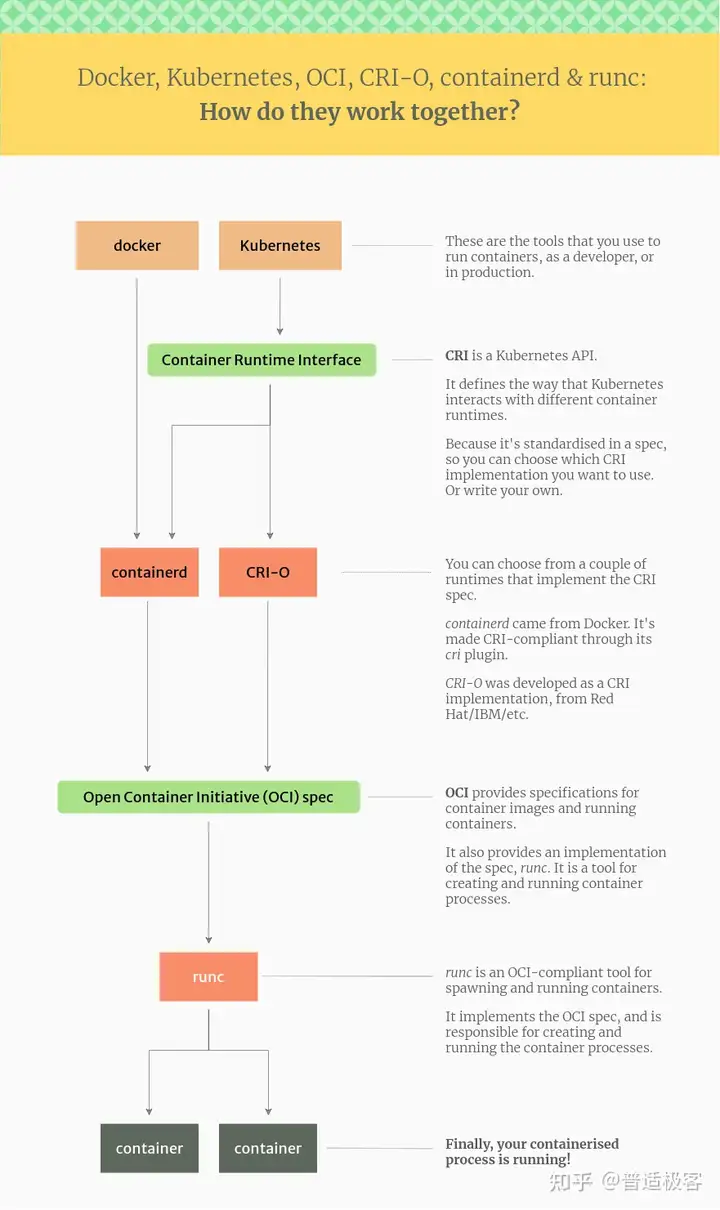","stroke":"","x":7890,"y":10,"layout":null,"isExpand":true,"pid":"d6ddf484-f4d2-362e","style":{"font-size":"16"}},{"id":"b5b33de2-ae6b-2058","text":"http://hub-mirror.c.163.com/","stroke":"#0f2d77","x":4060,"y":6808,"layout":null,"isExpand":true,"pid":"3cc16b8e-5e7f-8e0e"},{"id":"b5293506-89e8-0168","text":"docker-client \\","stroke":"#b6e24d","x":4060,"y":7078,"layout":null,"isExpand":true,"pid":"8598f6b4-cd68-28ec"},{"id":"2172ea5f-74a0-d5bd","text":"docker-client-latest \\","stroke":"#b6e24d","x":4060,"y":7096,"layout":null,"isExpand":true,"pid":"8598f6b4-cd68-28ec"},{"id":"4dc53599-c58d-41e4","text":"docker-common \\","stroke":"#b6e24d","x":4060,"y":7114,"layout":null,"isExpand":true,"pid":"8598f6b4-cd68-28ec"},{"id":"a73ecd69-b827-1395","text":"docker-latest \\","stroke":"#b6e24d","x":4060,"y":7132,"layout":null,"isExpand":true,"pid":"8598f6b4-cd68-28ec"},{"id":"abe08b72-cac1-640f","text":"docker-latest-logrotate \\","stroke":"#b6e24d","x":4060,"y":7150,"layout":null,"isExpand":true,"pid":"8598f6b4-cd68-28ec"},{"id":"5e66b141-11c3-729d","text":"docker-logrotate \\","stroke":"#b6e24d","x":4060,"y":7168,"layout":null,"isExpand":true,"pid":"8598f6b4-cd68-28ec"},{"id":"a785d704-c17f-9266","text":"docker-engine","stroke":"#b6e24d","x":4060,"y":7186,"layout":null,"isExpand":true,"pid":"8598f6b4-cd68-28ec"}]],"induceData":[],"wireFrameData":[],"relateLinkData":[],"calloutData":[]}